
Game Mode
Choosing A Faction
Battles pit three 33-player factions against each other. Each time you play, choose to fight for Lonestar, Valkyra, or Manticore.
Control Zone (CZ)
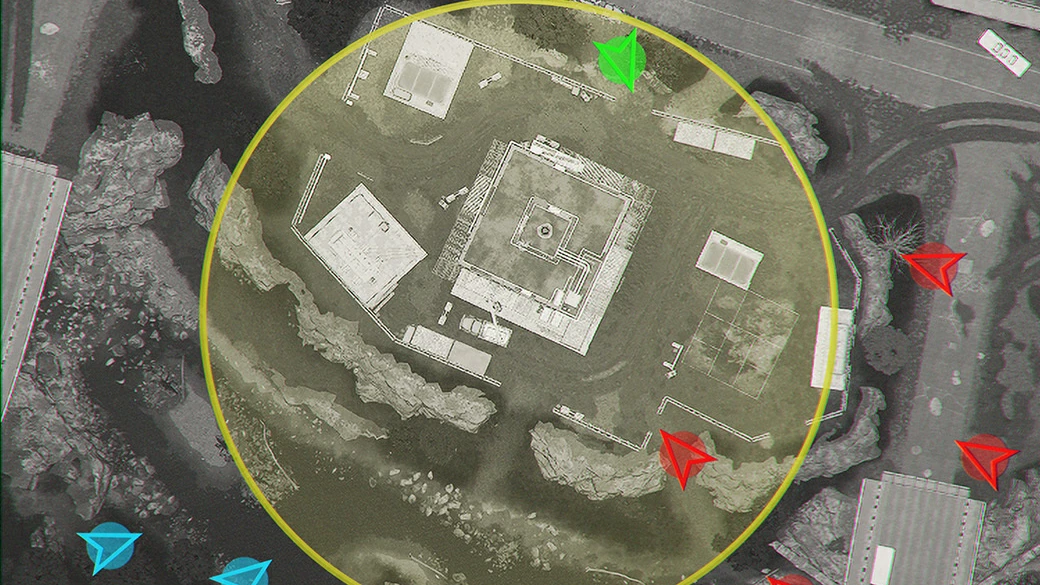
Your primary objective is the Control Zone (CZ) at the centre of the map.
Faction Count
Every player in the Control Zone contributes 1 point to their team's Faction Count. The team with the highest total, controls the Control Zone.
Hot Zone (HZ)
The Hot Zone (HZ) is a roaming sub-zone inside the Control Zone. Players in the Hot Zone count for twice the Faction Count and earn extra cash.
Scoring
A Match Point is awarded to the faction in control of the Control Zone when the tick bar fills.
Winning
The first Faction to reach 100 Match Points, wins the match.
Movement
Crouching and Prone
Use crouch and prone to take cover and reduce your silhouette, making you harder to hit.
Mantling
You can mantle over objects of different heights; the higher the obstacle, the longer the mantle takes.
Interaction
You can interact with objects in the world, such as doors. When several actions are available, an options list is shown so you can pick one.
Shooting
Aiming Down Sight (ADS)
While aiming down sights, you can focus, which will reduce your weapon sway.
Ammo Consolidation
Use the ammo consolidation button in your inventory to combine rounds of the same calibre, maximising the number of full magazines.
Fire Mode
Many weapons support multiple fire modes (e.g., semi-auto, burst, full-auto). Choose the mode that suits the fight.
Persistant Ammo
Ammo persists per magazine. If you reload with 1 round left, that 1-round mag stays in your backpack and will be reinserted when you cycle back to it.
Zeroing
Zeroing makes the reticle accurate at a chosen range. While aiming down sight, adjust the zero up or down to match your target distance.
Health
Body Dragging
If a friendly player is in a critical state, get within range, interact, and select drag. Interact againt whilst dragging to drop them.
Critical and Death
When your health reaches zero, you enter the critical state. If you aren't revived in time, you'll bleed out and respawn at Headquarters.
Health Bar
Your current health is displayed in a bar at the bottom right of the screen. Keep an eye on this whilst in combat.
Reviving
If a friendly player is in a critical state, get within range, interact, and select Revive. Reviving with no medical gear takes time, so watch your surroundings.
Cash
Earning Cash
Earning cash in Wardogs is easy. Almost every action rewards cash, including: • Being in the CZ & HZ • Killing • Reviving • Repairing • Building • Transporting players to the CZ
Persistent Cash
The cash you earn in a match is persistent. Whatever you leave the match with, is what you have to spend in the next match.
Spending Cash
Spend cash at Vendors to buy items and vehicles. Short on funds? Pick up the free weapon and go get some kills!
Career
Career Level
Your Career Level combines all role levels. Levelling up grants items that benefit all roles.
Earning XP and Roles
XP in Wardogs is earned per role: • Assault • Recon • Support • Medic • Pilot • Driver Complete role-specific actions to gain XP for that role (e.g., reviving grants Medic XP).